Wednesday, 29 October 2014

Ebola Virus

Ebola Virus


Key facts

  • Ebola virus disease (EVD), formerly known as Ebola haemorrhagic fever, is a severe, often fatal illness in humans.
  • The virus is transmitted to people from wild animals and spreads in the human population through human-to-human transmission.
  • The average EVD case fatality rate is around 50%. Case fatality rates have varied from 25% to 90% in past outbreaks.
  • The first EVD outbreaks occurred in remote villages in Central Africa, near tropical rainforests, but the most recent outbreak in west Africa has involved major urban as well as rural areas.
  • Community engagement is key to successfully controlling outbreaks. Good outbreak control relies on applying a package of interventions, namely case management, surveillance and contact tracing, a good laboratory service, safe burials and social mobilisation.
  • Early supportive care with rehydration, symptomatic treatment improves survival. There is as yet no licensed treatment proven to neutralise the virus but a range of blood, immunological and drug therapies are under development.
  • There are currently no licensed Ebola vaccines but 2 potential candidates are undergoing evaluation.

Background

The Ebola virus causes an acute, serious illness which is often fatal if untreated. Ebola virus disease (EVD) first appeared in 1976 in 2 simultaneous outbreaks, one in Nzara, Sudan, and the other in Yambuku, Democratic Republic of Congo. The latter occurred in a village near the Ebola River, from which the disease takes its name.
The current outbreak in west Africa, (first cases notified in March 2014), is the largest and most complex Ebola outbreak since the Ebola virus was first discovered in 1976. There have been more cases and deaths in this outbreak than all others combined. It has also spread between countries starting in Guinea then spreading across land borders to Sierra Leone and Liberia, by air (1 traveller only) to Nigeria, and by land (1 traveller) to Senegal.
The most severely affected countries, Guinea, Sierra Leone and Liberia have very weak health systems, lacking human and infrastructural resources, having only recently emerged from long periods of conflict and instability. On August 8, the WHO Director-General declared this outbreak a Public Health Emergency of International Concern.
A separate, unrelated Ebola outbreak began in Boende, Equateur, an isolated part of the Democratic Republic of Congo.
The virus family Filoviridae includes 3 genera: Cuevavirus, Marburgvirus, and Ebolavirus. There are 5 species that have been identified: Zaire, Bundibugyo, Sudan, Reston and Taï Forest. The first 3, Bundibugyo ebolavirus, Zaire ebolavirus, and Sudan ebolavirus have been associated with large outbreaks in Africa. The virus causing the 2014 west African outbreak belongs to the Zaire species.

Transmission

It is thought that fruit bats of the Pteropodidae family are natural Ebola virus hosts. Ebola is introduced into the human population through close contact with the blood, secretions, organs or other bodily fluids of infected animals such as chimpanzees, gorillas, fruit bats, monkeys, forest antelope and porcupines found ill or dead or in the rainforest.
Ebola then spreads through human-to-human transmission via direct contact (through broken skin or mucous membranes) with the blood, secretions, organs or other bodily fluids of infected people, and with surfaces and materials (e.g. bedding, clothing) contaminated with these fluids.
Health-care workers have frequently been infected while treating patients with suspected or confirmed EVD. This has occurred through close contact with patients when infection control precautions are not strictly practiced.
Burial ceremonies in which mourners have direct contact with the body of the deceased person can also play a role in the transmission of Ebola.
People remain infectious as long as their blood and body fluids, including semen and breast milk, contain the virus. Men who have recovered from the disease can still transmit the virus through their semen for up to 7 weeks after recovery from illness.

Symptoms of Ebola virus disease

The incubation period, that is, the time interval from infection with the virus to onset of symptoms is 2 to 21 days. Humans are not infectious until they develop symptoms. First symptoms are the sudden onset of fever fatigue, muscle pain, headache and sore throat. This is followed by vomiting, diarrhoea, rash, symptoms of impaired kidney and liver function, and in some cases, both internal and external bleeding (e.g. oozing from the gums, blood in the stools). Laboratory findings include low white blood cell and platelet counts and elevated liver enzymes.

Diagnosis

It can be difficult to distinguish EVD from other infectious diseases such as malaria, typhoid fever and meningitis. Confirmation that symptoms are caused by Ebola virus infection are made using the following investigations:
  • antibody-capture enzyme-linked immunosorbent assay (ELISA)
  • antigen-capture detection tests
  • serum neutralization test
  • reverse transcriptase polymerase chain reaction (RT-PCR) assay
  • electron microscopy
  • virus isolation by cell culture.
Samples from patients are an extreme biohazard risk; laboratory testing on non-inactivated samples should be conducted under maximum biological containment conditions.

Treatment and vaccines

Supportive care-rehydration with oral or intravenous fluids- and treatment of specific symptoms, improves survival. There is as yet no proven treatment available for EVD. However, a range of potential treatments including blood products, immune therapies and drug therapies are currently being evaluated. No licensed vaccines are available yet, but 2 potential vaccines are undergoing human safety testing.

Prevention and control

Good outbreak control relies on applying a package of interventions, namely case management, surveillance and contact tracing, a good laboratory service, safe burials and social mobilisation. Community engagement is key to successfully controlling outbreaks. Raising awareness of risk factors for Ebola infection and protective measures that individuals can take is an effective way to reduce human transmission. Risk reduction messaging should focus on several factors:
  • Reducing the risk of wildlife-to-human transmission from contact with infected fruit bats or monkeys/apes and the consumption of their raw meat. Animals should be handled with gloves and other appropriate protective clothing. Animal products (blood and meat) should be thoroughly cooked before consumption.
  • Reducing the risk of human-to-human transmission from direct or close contact with people with Ebola symptoms, particularly with their bodily fluids. Gloves and appropriate personal protective equipment should be worn when taking care of ill patients at home. Regular hand washing is required after visiting patients in hospital, as well as after taking care of patients at home.
  • Outbreak containment measures including prompt and safe burial of the dead, identifying people who may have been in contact with someone infected with Ebola, monitoring the health of contacts for 21 days, the importance of separating the healthy from the sick to prevent further spread, the importance of good hygiene and maintaining a clean environment.

Controlling infection in health-care settings:

Health-care workers should always take standard precautions when caring for patients, regardless of their presumed diagnosis. These include basic hand hygiene, respiratory hygiene, use of personal protective equipment (to block splashes or other contact with infected materials), safe injection practices and safe burial practices.
Health-care workers caring for patients with suspected or confirmed Ebola virus should apply extra infection control measures to prevent contact with the patient’s blood and body fluids and contaminated surfaces or materials such as clothing and bedding. When in close contact (within 1 metre) of patients with EBV, health-care workers should wear face protection (a face shield or a medical mask and goggles), a clean, non-sterile long-sleeved gown, and gloves (sterile gloves for some procedures).
Laboratory workers are also at risk. Samples taken from humans and animals for investigation of Ebola infection should be handled by trained staff and processed in suitably equipped laboratories.

WHO response

WHO aims to prevent Ebola outbreaks by maintaining surveillance for Ebola virus disease and supporting at-risk countries to developed preparedness plans. The document provides overall guidance for control of Ebola and Marburg virus outbreaks:
When an outbreak is detected WHO responds by supporting surveillance, community engagement, case management, laboratory services, contact tracing, infection control, logistical support and training and assistance with safe burial practices.
WHO has developed detailed advice on Ebola infection prevention and control:

Table: Chronology of previous Ebola virus disease outbreaks


YearCountryEbolavirus speciesCasesDeathsCase fatality
2012Democratic Republic of CongoBundibugyo572951%
2012UgandaSudan7457%
2012UgandaSudan241771%
2011UgandaSudan11100%
2008Democratic Republic of CongoZaire321444%
2007UgandaBundibugyo1493725%
2007Democratic Republic of CongoZaire26418771%
2005CongoZaire121083%
2004SudanSudan17741%
2003 (Nov-Dec)CongoZaire352983%
2003 (Jan-Apr)CongoZaire14312890%
2001-2002CongoZaire594475%
2001-2002GabonZaire655382%
2000UgandaSudan42522453%
1996South Africa (ex-Gabon)Zaire11100%
1996 (Jul-Dec)GabonZaire604575%
1996 (Jan-Apr)GabonZaire312168%
1995Democratic Republic of CongoZaire31525481%
1994Cote d'IvoireTaï Forest100%
1994GabonZaire523160%
1979SudanSudan342265%
1977Democratic Republic of CongoZaire11100%
1976SudanSudan28415153%
1976Democratic Republic of CongoZaire31828088%

Wednesday, 15 October 2014

Windows 7 Backup To Network Location

If you want to prevent your computer from worst your data, files. you can take take backup of your computer to a network location. This the enhance feature in windows 7. you can create backup schedule of your computer. In the future in the failure of you computer you can recover your all data from backup which you have take on Network.


 Take Windows 7 Backup To Network Location


Follows these steps to take backup windows 7 to a network location ...

Windows 7 Backup to Network Location

1. Click on Start button , then type backup and restore in  Search box and then Click on Backup and Restore option .


2.  Now Click on Set Up Backup on Back Up or restore windows .


3. Now You have to choose Backup location where you want to take Back Up, Click on Save on a network.. for Backup on a network Location .


4. Now Click on Browse and select network Location where you want to take backup , Folder must be shared in which you want to take back up .
or
Type the Path of the Share folder where you want to take backup on your Home Network

 then Give to User name and password of Network Location system and then Click on OK .


5.  Now Select Backup destination which you have added , then Click on Next .


6. If you choose Let choose windows backup , then it will not backup of drive which formatted with FAT .
Then you can choose Let me choose for Custom backup  and then Click on Next .


7. Now select file or Folder check box  which you want to take backup and you can select Include a System image of drive : SYSTEM drive to Backup of System Image Drive then Click on Next .


8. Now check your selected files and folder for backup . and if you want to change schedule of your backup then click on change schedule , and then next windows Select date and time for schedule and then Click on ok and then Click save setting and run backup .


9. Now Backup Process is Going on .............


Tuesday, 14 October 2014

Who Hacked Dropbox ?


Nearly 7 Million Dropbox Account Passwords Allegedly Hacked
Internet users have faced a number of major privacy breaches in last two months. Major in the list are The Fappening, The Snappening and now the latest privacy breach in Dropbox security has gained everybody’s attention across the world.

Dropbox, the popular online locker service, appears to have been hacked by an unnamed hacker group. It is still unclear how the account details of so many users were accessed and, indeed, if they are actually legitimate or not. However, the group claims to have accessed details from nearly 7 million individual accounts and are threatening to release users’ photos, videos and other files.

HACKERS CLAIMED TO RELEASE 7 MILLION USERS’ PERSONAL DATA
A thread surfaced on Reddit today that include links to files containing hundreds of usernames and passwords for Dropbox accounts in plain text. Also a series of posts with hundreds of alleged usernames and passwords for Dropbox accounts have been made to Pastebin, an anonymous information-sharing site.

Hackers have already leaked about 400 accounts by posting login credentials, all starting with the letter B, and labelled it as a "first teaser...just to get things going". The perpetrators are also promising to release more more password details if they're paid a Bitcoin ransom.
"More Bitcoin = more accounts published on Pastebin. As more BTC is donated, More pastebin pastes will appear."
The security breach in Dropbox would definitely have bothered its millions of users and since passwords are involved in this incident, so it has more frightening consequences on its users. Reddit users have tested some of the leaked username and password combinations and confirmed that at least some of them work.

DROPBOX DENIED THE HACK - THIRD PARTY IS RESPONSIBLE
However, Dropbox has denied it has been hacked, saying the passwords were stolen apparently from third-party services that users allowed to access their accounts. In a statement to The Next Web, Dropbox said:
"Dropbox has not been hacked. These usernames and passwords were unfortunately stolen from other services and used in attempts to log in to Dropbox accounts. We'd previously detected these attacks and the vast majority of the passwords posted have been expired for some time now. All other remaining passwords have expired as well."
The incident came just few days after the Snappening incident in which the personal images of as much as100,000 Snapchat users were leaked online, which was the result of a security breach in the its third-party app.

Snapchat has denied that its service or server was ever compromised, but the servers of a third-party app designed to save Snapchat photos, which became the target for hackers to obtain personal photographs.

DROPBOX - "HOSTILE TO PRIVACY" SAYS SNOWDEN
Dropbox was in the news earlier this week when, in a recent interview with The Guardian, NSA whistleblowerEdward Snowden called Dropbox a "targeted, wannabe PRISM partner" that is "very hostile to privacy" — referring to its ability to access your data itself, which is yet another security consideration when it comes to web services.

Snowden suggested web users to stop using Dropbox and warned them that the cloud storage service does not safeguard users’ privacy because it holds encryption keys and can therefore be forced by governments to hand over the personal data they store on its servers. He suggested people to use an alternative cloud storage provider that do not store any encryption keys, so that the users’ data cannot be read by anyone.
USERS ARE ADVISED TO CHANGE PASSWORDS
Until the full scope of the problem is known, it’s probably worthwhile changing your password. But whether the attack is confirmed or not, it’s a good idea to change your password just to be on a safer side — especially for those users who use same password for multiple services.

Users are also recommended to turn on two-factor authentication, which Dropbox now supports and install a time-based, one-time password app on a mobile device.

Update: Dropbox has issued a statement on its blog further clarifying that the Dropbox passwords were stolen from "unrelated services."
"The usernames and passwords...were stolen from unrelated services, not Dropbox," the company said in a blog post. "Attackers then used these stolen credentials to try to log in to sites across the internet, including Dropbox. We have measures in place that detect suspicious login activity and we automatically reset passwords when it happens."
"Attacks like these are one of the reasons why we strongly encourage users not to reuse passwords across services. For an added layer of security, we always recommend enabling 2 step verification on your account."

Monday, 13 October 2014

What is RAID ?

RAID is a Redundant Array of Inexpensive disks, but nowadays it is called Redundant Array of Independent drives. Earlier it is used to be very costly to buy even a smaller size of disk, but nowadays we can buy a large size of disk with the same amount like before. Raid is just a collection of disks in a pool to become a logical volume.
RAID in Linux
Understanding RAID Setups in Linux
Raid contains groups or sets or Arrays. A combine of drivers make a group of disks to form a RAID Array or RAID set. It can be a minimum of 2 number of disk connected to a raid controller and make a logical volume or more drives can be in a group. Only one Raid level can be applied in a group of disks. Raid are used when we need excellent performance. According to our selected raid level, performance will differ. Saving our data by fault tolerance & high availability.
This series will be titled Preparation for the setting up RAID ‘s through Parts 1-9 and covers the following topics.
Part 1: Introduction to RAID, Concepts of RAID and RAID Levels
Part 2: How to setup RAID0 (Stripe) in Linux
Part 3: How to setup RAID1 (Mirror) in Linux
Part 4: How to setup RAID5 (Striping with Distributed Parity) in Linux
Part 5: How to setup RAID6 (Striping with Double Distributed Parity) in Linux
Part 6: How to setup RAID10 or 1+0 (Nested) in Linux
Part 7: Grow a RAID Array in Linux
Part 8: Recovering (Rebuilding) failed drives in RAID
Part 9: Managing RAID in Linux
This is the Part 1 of a 9-tutorial series, here we will cover the introduction of RAID, Concepts of RAID and RAID Levels that are required for the setting up RAID in Linux.

Software RAID and Hardware RAID

Software RAID have low performance, because of consuming resource from hosts. Raid software need to load for read data from software raid volumes. Before loading raid software, OS need to get boot to load the raid software. No need of Physical hardware in software raids. Zero cost investment.
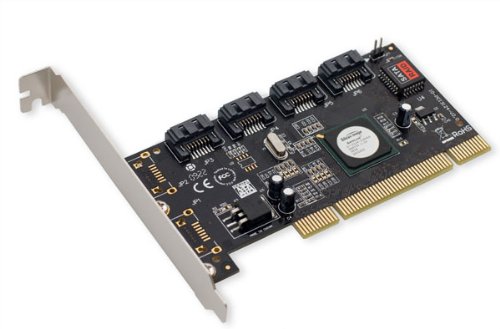
Hardware RAID have high performance. They are dedicated RAID Controller which is Physically built using PCI express cards. It won’t use the host resource. They have NVRAM for cache to read and write. Stores cache while rebuild even if there is power-failure, it will store the cache using battery power backups. Very costly investments needed for a large scale.
Hardware RAID Card will look like below:
Hardware RAID
Hardware RAID

Featured Concepts of RAID

  1. Parity method in raid regenerate the lost content from parity saved information’s. RAID 5, RAID 6 Based on Parity.
  2. Stripe is sharing data randomly to multiple disk. This won’t have full data in a single disk. If we use 3 disks half of our data will be in each disks.
  3. Mirroring is used in RAID 1 and RAID 10. Mirroring is making a copy of same data. In RAID 1 it will save the same content to the other disk too.
  4. Hot spare is just a spare drive in our server which can automatically replace the failed drives. If any one of the drive failed in our array this hot spare drive will be used and rebuild automatically.
  5. Chunks are just a size of data which can be minimum from 4KB and more. By defining chunk size we can increase the I/O performance.
RAID’s are in various Levels. Here we will see only the RAID Levels which is used mostly in real environment.
  1. RAID0 = Striping
  2. RAID1 = Mirroring
  3. RAID5 = Single Disk Distributed Parity
  4. RAID6 = Double Disk Distributed Parity
  5. RAID10 = Combine of Mirror & Stripe. (Nested RAID)
RAID are managed using mdadm package in most of the Linux distributions. Let us get a Brief look into each RAID Levels.

RAID 0 (or) Striping

Striping have a excellent performance. In Raid 0 (Striping) the data will be written to disk using shared method. Half of the content will be in one disk and another half will be written to other disk.
Let us assume we have 2 Disk drives, for example, if we write data “TECMINT” to logical volume it will be saved as ‘T‘ will be saved in first disk and ‘E‘ will be saved in Second disk and ‘C‘ will be saved in First disk and again ‘M‘ will be saved in Second disk and it continues in round-robin process.
In this situation if any one of the drive fails we will loose our data, because with half of data from one of the disk can’t use to rebuilt the raid. But while comparing to Write Speed and performance RAID 0 is Excellent. We need at least minimum 2 disks to create a RAID 0 (Striping). If you need your valuable data don’t use this RAID LEVEL.
  1. High Performance.
  2. There is Zero Capacity Loss in RAID 0
  3. Zero Fault Tolerance.
  4. Write and Reading will be good performance.

RAID 1 (or) Mirroring

Mirroring have a good performance. Mirroring can make a copy of same data what we have. Assuming we have two numbers of 2TB Hard drives, total there we have 4TB, but in mirroring while the drives are behind the RAID Controller to form a Logical drive Only we can see the 2TB of logical drive.
While we save any data, it will write to both 2TB Drives. Minimum two drives are needed to create a RAID 1 or Mirror. If a disk failure occurred we can reproduce the raid set by replacing a new disk. If any one of the disk fails in RAID 1, we can get the data from other one as there was a copy of same content in the other disk. So there is zero data loss.
  1. Good Performance.
  2. Here Half of the Space will be lost in total capacity.
  3. Full Fault Tolerance.
  4. Rebuilt will be faster.
  5. Writing Performance will be slow.
  6. Reading will be good.
  7. Can be used for operating systems and database for small scale.

RAID 5 (or) Distributed Parity

RAID 5 is mostly used in enterprise levels. RAID 5 work by distributed parity method. Parity info will be used to rebuild the data. It rebuilds from the information left on the remaining good drives. This will protect our data from drive failure.
Assume we have 4 drives, if one drive fails and while we replace the failed drive we can rebuild the replaced drive from parity informations. Parity information’s are Stored in all 4 drives, if we have 4 numbers of 1TB hard-drive. The parity information will be stored in 256GB in each drivers and other 768GB in each drives will be defined for Users. RAID 5 can be survive from a single Drive failure, If drives fails more than 1 will cause loss of data’s.
  1. Excellent Performance
  2. Reading will be extremely very good in speed.
  3. Writing will be Average, slow if we won’t use a Hardware RAID Controller.
  4. Rebuild from Parity information from all drives.
  5. Full Fault Tolerance.
  6. 1 Disk Space will be under Parity.
  7. Can be used in file servers, web servers, very important backups.

RAID 6 Two Parity Distributed Disk

RAID 6 is same as RAID 5 with two parity distributed system. Mostly used in a large number of arrays. We need minimum 4 Drives, even if there 2 Drive fails we can rebuild the data while replacing new drives.
Very slower than RAID 5, because it writes data to all 4 drivers at same time. Will be average in speed while we using a Hardware RAID Controller. If we have 6 numbers of 1TB hard-drives 4 drives will be used for data and 2 drives will be used for Parity.
  1. Poor Performance.
  2. Read Performance will be good.
  3. Write Performance will be Poor if we not using a Hardware RAID Controller.
  4. Rebuild from 2 Parity Drives.
  5. Full Fault tolerance.
  6. 2 Disks space will be under Parity.
  7. Can be Used in Large Arrays.
  8. Can be use in backup purpose, video streaming, used in large scale.

RAID 10 (or) Mirror & Stripe

RAID 10 can be called as 1+0 or 0+1. This will do both works of Mirror & Striping. Mirror will be first and stripe will be the second in RAID 10. Stripe will be the first and mirror will be the second in RAID 01. RAID 10 is better comparing to 01.
Assume, we have 4 Number of drives. While I’m writing some data to my logical volume it will be saved under All 4 drives using mirror and stripe methods.
If I’m writing a data “TECMINT” in RAID 10 it will save the data as follow. First “T” will write to both disks and second “E” will write to both disk, this step will be used for all data write. It will make a copy of every data to other disk too.
Same time it will use the RAID 0 method and write data as follow “T” will write to first disk and “E” will write to second disk. Again “C” will write to first Disk and “M” to second disk.
  1. Good read and write performance.
  2. Here Half of the Space will be lost in total capacity.
  3. Fault Tolerance.
  4. Fast rebuild from copying data.
  5. Can be used in Database storage for high performance and availability.

Conclusion

In this article we have seen what is RAID and which levels are mostly used in RAID in real environment. Hope you have learned the write-up about RAID. For RAID setup one must know about the basic Knowledge about RAID. The above content will fulfil basic understanding about RAID.
In the next upcoming articles I’m going to cover how to setup and create a RAID using Various Levels, Growing a RAID Group (Array) and Troubleshooting with failed Drives and much more.

VMware Cloud Learning Video's

Here is a nice summary list of all VMworld US 2018 Breakout session with the respective video playback & download URLs. Enjoy! Bra...